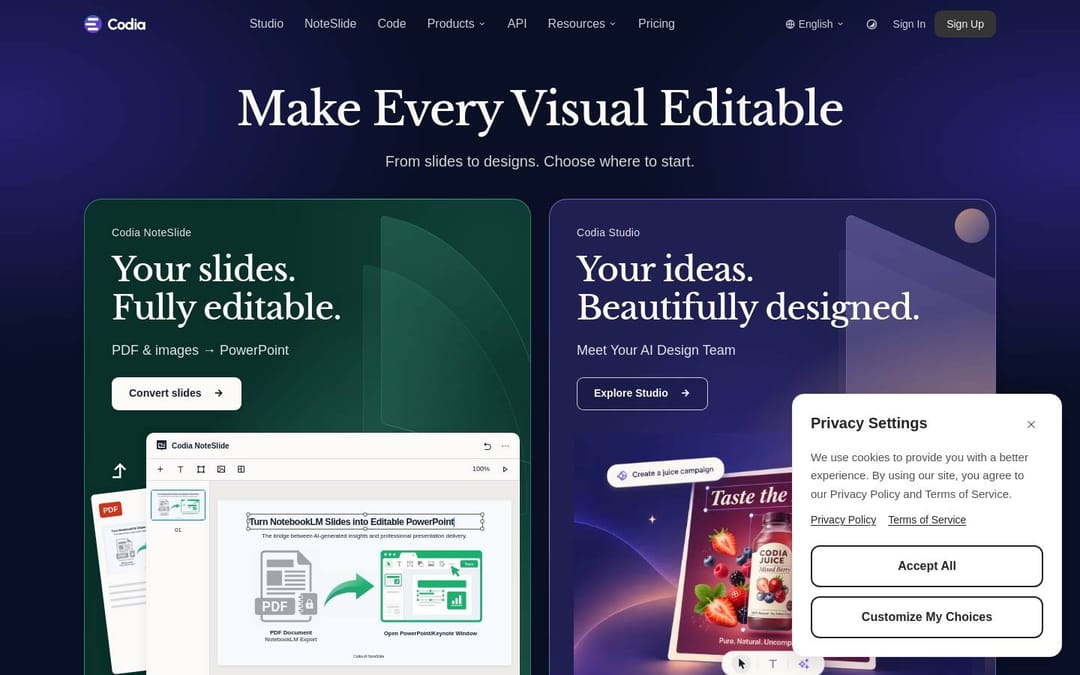
Codia website clone
A pixel-faithful, Codia-style landing page you can download, fine-tune, and deploy. AI design-to-code workflow sections with strong feature depth and product-led structure.
The Codia clone is a component-based React + Tailwind rebuild of codia.ai's marketing site — a 19-section light-theme design with Libre Baskerville headings, an indigo (#4f66d8) accent and a product-mockup-led hero. Preview the whole clone free, then export the source to rebrand it as your own.
No subscription · one source unlock per clone · you own 100% of the code

Download a Codia-style marketing site built with React and Tailwind — 19 sections, Libre Baskerville headings, an indigo accent. Preview free, export the source, rebrand it as your own.
Clique em Visualizar ao vivo para carregar o clone real e rolável em seu navegador – gratuito, sem inscrição. Visualização estática até então.
The full table of contents, not a screenshot
Every row is one real component in the download — the heading is the section's live copy, the file is what you open to change it. 19 sections, nothing stubbed.
Codia's colors & type, measured
The real design tokens, pulled from the source. Download them free — then export the whole built site when you're ready.

Download the design tokens
The palette, fonts and radius above — exported as .json + design.md. The built site stays a paid export.
Also served as a per-brand design.md for AI engines.
Real source, not a screenshot
Full source — a complete Codia-style page built with React · Tailwind.
Componentized & responsive — clean sections, mobile-first, easy to edit.
Brand-swappable — logo, copy, colors and images are placeholders, ready to replace.
Deploy in one click — ships to Cloudflare / Vercel / Netlify out of the box.
Built with React + Tailwind v4
From clone to your site in three steps
- 01
Download the Codia clone source.
- 02
Swap branding — replace logo, copy, colors and images with your own.
- 03
Deploy to Cloudflare, Vercel, or Netlify and ship.
Codia clone vs the alternatives
Why the Codia site works
codia.ai sells a design-to-code promise, and its site keeps that promise by showing the product instead of describing it: the hero isn't a headline over stock art, it's a live-looking Codia Studio browser window — chat panel on the left, a canvas of AI-generated packaging on the right — so you watch the tool do the thing before you read a word.
The palette is deliberately restrained: a near-white page, #252525 ink, and a single confident indigo (#4f66d8) reserved for CTAs and accent glyphs, which is what keeps nineteen sections from ever feeling busy.
Hierarchy is carried by type, not color — Libre Baskerville serif headings (weight 500) against Inter body read editorial and premium rather than generic-SaaS.
One section breaks the light rhythm on purpose: 'Powered by Codia AI Vision' drops to full dark (#17171c) under an indigo bloom, giving the technology story its own gravity without theming the rest of the page.
Cards are generously rounded with soft, low-contrast shadows, and the indigo returns as a 10% tint behind feature icons.
It's a template that fits any AI or developer tool that needs to look capable and calm while showing a product in action.
Não quer fazer isso sozinho?
Precisa que o site Codia inteiro seja clonado, adaptado para sua marca e publicado? Fale conosco sobre uma cotação de Full Clone.
Coming soon · hello@clonesite.ai
Codia clone — common questions
What font does the Codia clone use?+
Libre Baskerville for headings (weight 500) and Inter for body and UI — both self-hosted in the exported source, no external font dependency.
What colors are in the Codia template?+
A light base (#ffffff page, #252525 ink) with a single indigo accent #4f66d8 (plus a 10% tint behind icons) and one dark section at #17171c. The full palette ships as design tokens in the theme.
Is the Codia site built with React and Tailwind?+
Yes. The clone is React + Tailwind v4, with Base UI for interactive parts (the FAQ accordion) and CVA for component variants. No proprietary builder, no export lock-in.
How many sections does the Codia clone include?+
Nineteen — from the Studio-mockup hero and the horizontal product carousel to the dark 'AI Vision' technology band, pricing, and a 12-question FAQ.
Can I deploy the Codia clone to Vercel, Netlify or Cloudflare?+
Yes. It's a standard React + Tailwind build with no proprietary runtime, so it deploys anywhere you host static or SSR React.
Does the clone include the hero's Studio mockup and animations?+
Yes. The Codia Studio browser window (chat panel + generated-design canvas) and the scroll-in motion are part of the source you export.
Is the Codia clone responsive on mobile?+
Yes — desktop, tablet and mobile layouts are preserved end to end across all nineteen sections.
Can I use the Codia clone commercially?+
Clone the layout and structure, then replace Codia's logo, brand name, copy and images with your own before you ship. We don't copy trademarks or brand assets — treat it as a customization scaffold.
More clone examples like Codia
Back to clone examples →Canva clone
Download the source, replace the brand, and ship it as your own.
View cloneFerramentas de designFramer clone
Download the source, replace the brand, and ship it as your own.
View cloneFerramentas de designCopyWeb clone
Download the source, replace the brand, and ship it as your own.
View cloneGuides for making it yours
How to clone a website from a URL
The full flow: paste a URL, preview for free, export editable source.
Read the guideGuideIs it legal to clone a website?
What you can keep from a cloned page, and what you must replace before shipping.
Read the guideGuideMake the clone your own
Five design moves that turn a cloned template into your brand.
Read the guideDisclaimer. clonesite is not affiliated with, endorsed by, or sponsored by Codia or any brand shown. Clones reproduce publicly visible layout and front-end structure for learning and customization — replace all brand assets, names and copy with your own before publishing.