Codia website clone
A pixel-faithful, Codia-style landing page you can download, fine-tune, and deploy. AI design-to-code workflow sections with strong feature depth and product-led structure.
The Codia clone is a component-based React + Tailwind rebuild of codia.ai's marketing site — a 19-section light-theme design with Libre Baskerville headings, an indigo (#4f66d8) accent and a product-mockup-led hero. Preview the whole clone free, then export the source to rebrand it as your own.
No subscription · one source unlock per clone · you own 100% of the code
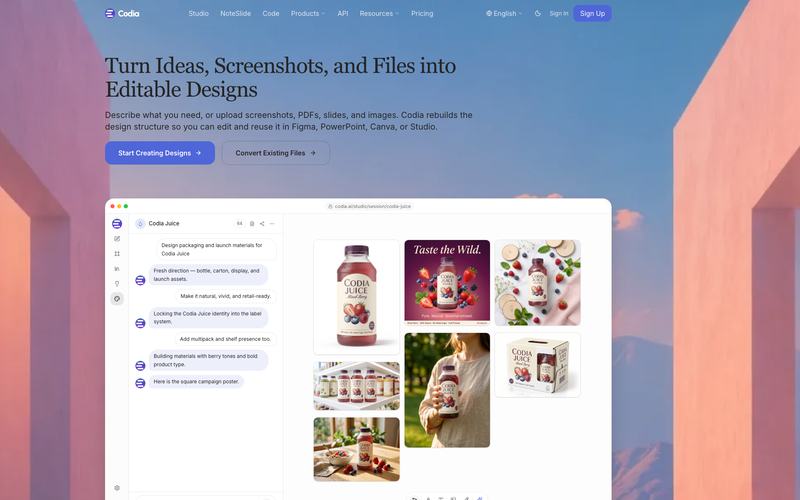
Download a Codia-style marketing site built with React and Tailwind — 19 sections, Libre Baskerville headings, an indigo accent. Preview free, export the source, rebrand it as your own.
Click Preview live to load the real, scrollable clone in your browser — free, no signup. Static preview until then.
The full table of contents, not a screenshot
Every row is one real component in the download — the heading is the section's live copy, the file is what you open to change it. 19 sections, nothing stubbed.
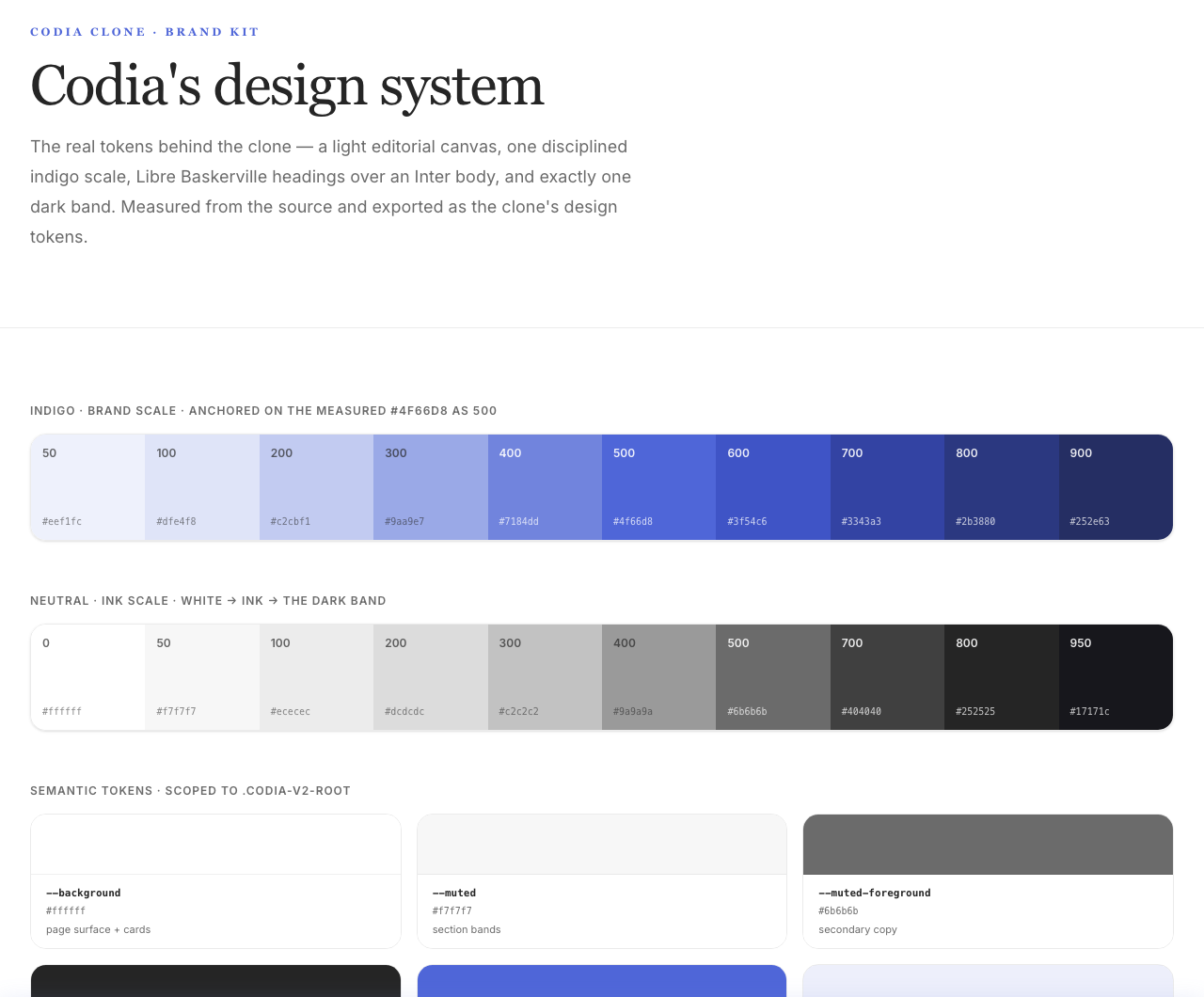
Codia's colors & type, measured
The real design tokens, pulled from the source. Download them free — then export the whole built site when you're ready.
Download the design tokens
The palette, fonts and radius above — exported as .json + design.md. The built site stays a paid export.
Also served as a per-brand design.md for AI engines.
Real source, not a screenshot
Full source — a complete Codia-style page built with React · Tailwind.
Componentized & responsive — clean sections, mobile-first, easy to edit.
Brand-swappable — logo, copy, colors and images are placeholders, ready to replace.
Deploy in one click — ships to Cloudflare / Vercel / Netlify out of the box.
Built with React + Tailwind v4
From clone to your site in three steps
- 01
Download the Codia clone source.
- 02
Swap branding — replace logo, copy, colors and images with your own.
- 03
Deploy to Cloudflare, Vercel, or Netlify and ship.
Codia clone vs the alternatives
Why the Codia site works
codia.ai sells a design-to-code promise, and its site keeps that promise by showing the product instead of describing it: the hero isn't a headline over stock art, it's a live-looking Codia Studio browser window — chat panel on the left, a canvas of AI-generated packaging on the right — so you watch the tool do the thing before you read a word.
The palette is deliberately restrained: a near-white page, #252525 ink, and a single confident indigo (#4f66d8) reserved for CTAs and accent glyphs, which is what keeps nineteen sections from ever feeling busy.
Hierarchy is carried by type, not color — Libre Baskerville serif headings (weight 500) against Inter body read editorial and premium rather than generic-SaaS.
One section breaks the light rhythm on purpose: 'Powered by Codia AI Vision' drops to full dark (#17171c) under an indigo bloom, giving the technology story its own gravity without theming the rest of the page.
Cards are generously rounded with soft, low-contrast shadows, and the indigo returns as a 10% tint behind feature icons.
It's a template that fits any AI or developer tool that needs to look capable and calm while showing a product in action.
Don't want to do it yourself?
Need the full Codia site cloned, rebranded, and shipped live? Talk to us about a Full Clone quote.
Coming soon · hello@clonesite.ai
Codia clone — common questions
What font does the Codia clone use?+
Libre Baskerville for headings (weight 500) and Inter for body and UI — both self-hosted in the exported source, no external font dependency.
What colors are in the Codia template?+
A light base (#ffffff page, #252525 ink) with a single indigo accent #4f66d8 (plus a 10% tint behind icons) and one dark section at #17171c. The full palette ships as design tokens in the theme.
Is the Codia site built with React and Tailwind?+
Yes. The clone is React + Tailwind v4, with Base UI for interactive parts (the FAQ accordion) and CVA for component variants. No proprietary builder, no export lock-in.
How many sections does the Codia clone include?+
Nineteen — from the Studio-mockup hero and the horizontal product carousel to the dark 'AI Vision' technology band, pricing, and a 12-question FAQ.
Can I deploy the Codia clone to Vercel, Netlify or Cloudflare?+
Yes. It's a standard React + Tailwind build with no proprietary runtime, so it deploys anywhere you host static or SSR React.
Does the clone include the hero's Studio mockup and animations?+
Yes. The Codia Studio browser window (chat panel + generated-design canvas) and the scroll-in motion are part of the source you export.
Is the Codia clone responsive on mobile?+
Yes — desktop, tablet and mobile layouts are preserved end to end across all nineteen sections.
Can I use the Codia clone commercially?+
Clone the layout and structure, then replace Codia's logo, brand name, copy and images with your own before you ship. We don't copy trademarks or brand assets — treat it as a customization scaffold.
More clone examples like Codia
Back to clone examples →Guides for making it yours
How to clone a website from a URL
The full flow: paste a URL, preview for free, export editable source.
Read the guideGuideIs it legal to clone a website?
What you can keep from a cloned page, and what you must replace before shipping.
Read the guideGuideMake the clone your own
Five design moves that turn a cloned template into your brand.
Read the guideDisclaimer. clonesite is not affiliated with, endorsed by, or sponsored by Codia or any brand shown. Clones reproduce publicly visible layout and front-end structure for learning and customization — replace all brand assets, names and copy with your own before publishing.