Claude Code Clone: How to Clone a Website With Claude Code (2026)
Claude Code clone walkthrough — the five-phase agentic pipeline that measures a live page and rebuilds it as editable React and Tailwind, where unattended runs break, and when a hosted AI website cloner is the better path.
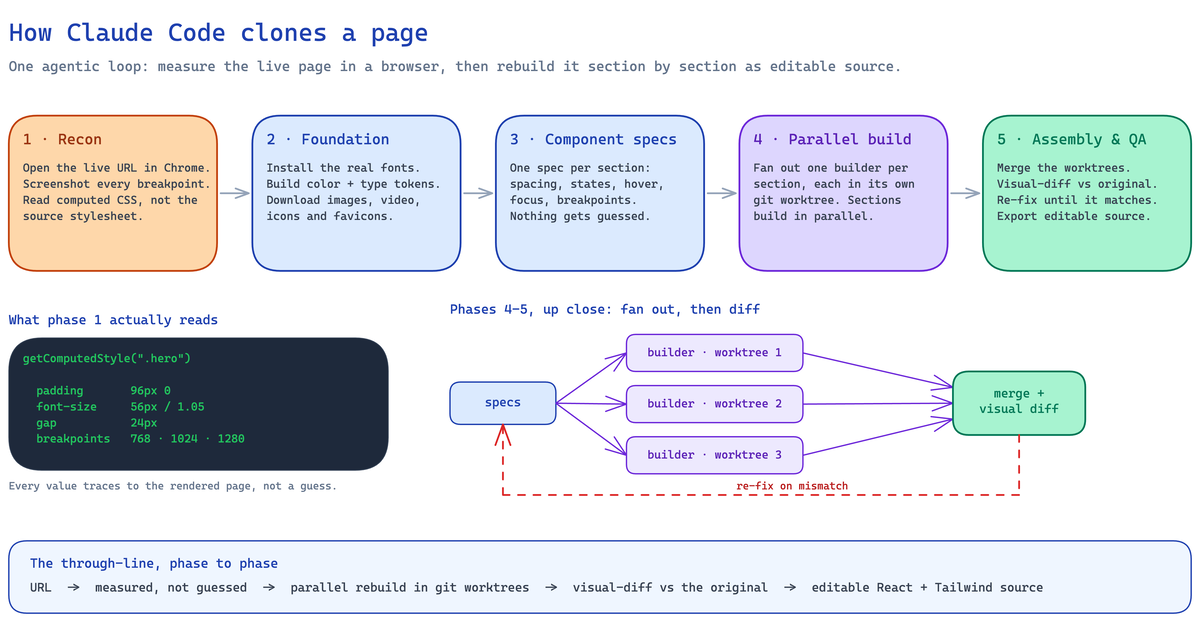
Cloning a website with Claude Code is not a screenshot tool and not a "save page as." It is an agentic pipeline: you point Claude Code at a live URL, and it measures the real page in a browser — computed CSS, every breakpoint, every asset — then rebuilds it, section by section, as editable React and Tailwind source.
The method is measured, not guessed. That single difference is why the output is code you can edit and rebrand, instead of a flattened copy of someone else's page. Below is exactly how the pipeline works, the setup it needs, and — the part most guides skip — the sites where an unattended run breaks.
This is the same measure-then-rebuild pipeline we run in production at Clonesite, so this guide is written from running it, not guessing at it. If you want the no-setup version of the same flow, point our hosted website cloner at the URL instead, or start with our guide on how to clone a website.
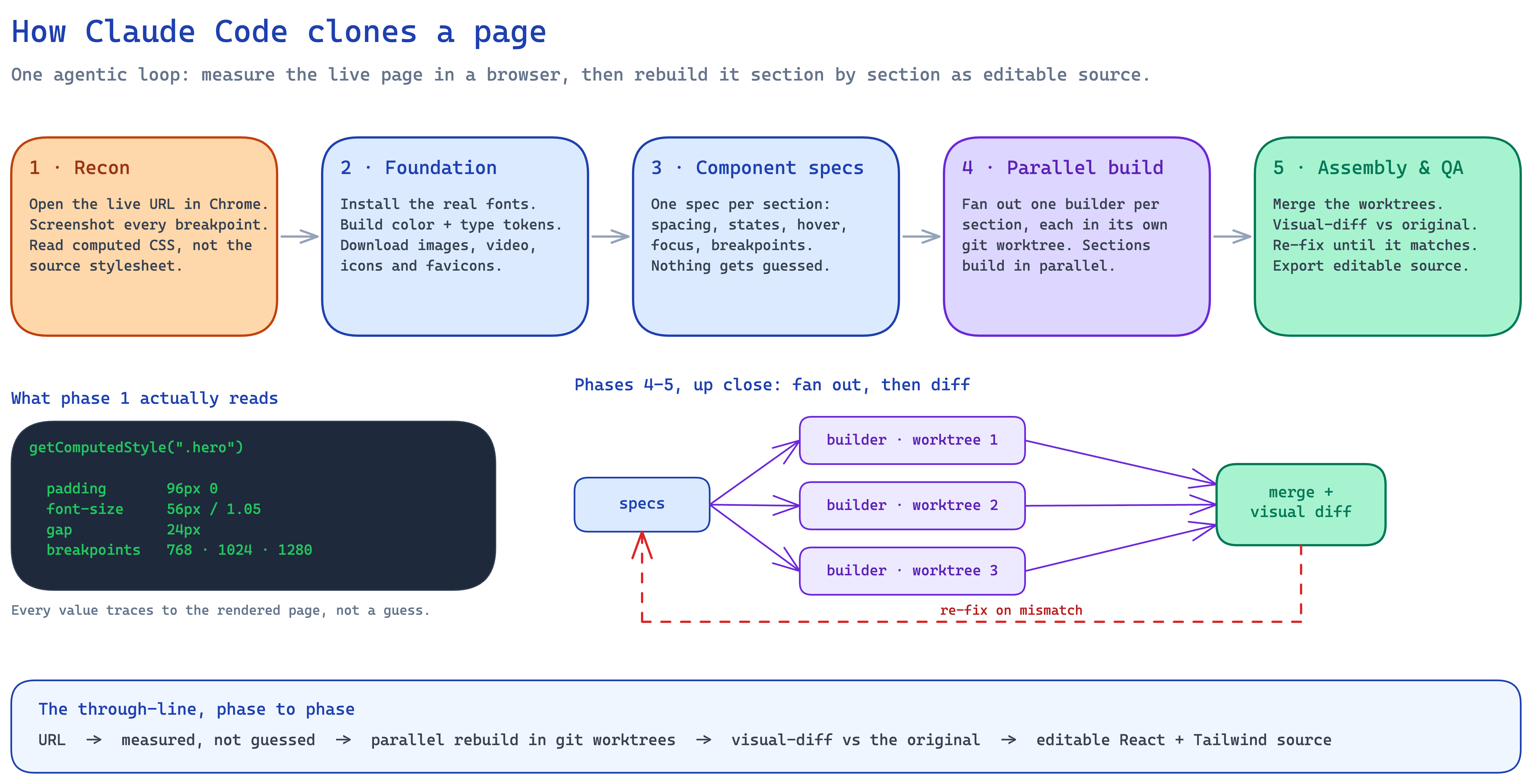
One agentic loop: measure the live page, rebuild it section by section, diff it against the original.
TL;DR
| Question | Answer |
|---|---|
| What is it? | Point Claude Code (an agentic coding tool) at a live URL; it measures the page and rebuilds it as editable React + Tailwind source. |
| What do you need? | Claude Code with browser access (Chrome or a Playwright MCP), a capable model, Node, and a clone prompt or skill. |
| One command? | With a clone skill installed, roughly one command (/clone-website <url>). Without one, a guided multi-step prompt. |
| What do you get? | Real components, spacing, tokens, and breakpoints — editable source, not a screenshot. |
| Where does it break? | Heavy motion/animation, WebGL, commercial fonts, and lazy-loaded/CDN assets. |
| Can you skip the setup? | Clonesite runs this same pipeline hosted — paste a URL, get a free preview, $2 to start, refundable. |
What "cloning with Claude Code" actually means
A URL gives an agent far more than a screenshot can. When Claude Code opens the page in a real browser, it
does not read the stylesheet and hope — it reads the rendered values: getComputedStyle() for spacing and
type, the actual responsive behavior at each breakpoint, the real fonts, and every image, video, and icon the
page loads.
That measured picture is the input to a rebuild. Instead of one giant "rewrite this HTML" prompt, the agent turns the page into a set of specifications and builds against them. The result is a starting point you own — layout you can rearrange, components you can edit, tokens you can swap — not a copy you have to reverse out of minified markup.
The pipeline: five phases
Every good agentic clone runs the same shape. The diagram above shows it end to end; here is what each phase is doing.
- Reconnaissance. Open the live URL in Chrome. Take full-page screenshots at every breakpoint. Scroll, hover, click, and read computed CSS — inherited values, specificity overrides, browser defaults — not just the source stylesheet.
- Foundation. Install the real fonts. Build the color and type system as design tokens. Download every image, video, favicon, and OG asset into organized folders before writing a line of layout.
- Component specs. Write one specification file per section: exact spacing, type scale, hover and focus states, scroll behavior, and responsive rules. Nothing downstream gets guessed.
- Parallel build. Fan out one builder agent per section, each working from the full spec in an isolated git worktree. Sections build simultaneously and merge without stepping on each other.
- Assembly & QA. Merge the worktrees into one page, then run a visual diff against the original screenshots and re-fix until the clone matches. The QA step is a loop, not a checkbox.
The reason this beats a single prompt is boring but decisive: measured, not guessed. Every value the agent writes traces back to something it observed on the real page.
Setting it up yourself
To run the pipeline on your own machine you need four things:
- Claude Code with browser access — either the Chrome integration or a Playwright MCP so the agent can actually open and inspect the page.
- A capable model — Opus 4.8. Cloning is a long-horizon, many-step job; the model has to hold one spec together across dozens of sections and tool calls. Opus 4.8 is our default. We also tried heavier "expert" reasoning models — Codex 5.5 among them — and for this task they were not a better fit: the clone loop rewards sustained, many-step tool use over deep per-step reasoning, so an expert model spends its budget in the wrong place across a long run.
- Node and a project to write into.
- A clone prompt or skill. Community Claude Code skills package the five phases into a single
/clone-website <url>command; without one, you drive the phases with a structured prompt. The open-source ai-website-cloner-template is a good example of exactly this pipeline — it wires the five phases to/clone-websiteand recommends Claude Code with Opus 4.8.
From there it is: start the agent with browser access, point it at the URL, and let it run recon → foundation → specs → build → QA. Then you review — because a clone is a draft, not a deploy.
One choice that template makes for you is the output framework: it hard-wires every clone into a full Next.js App Router app. That is fine if you specifically want a Next.js codebase, but it is a lot of scaffold for a marketing page you just want to host — and it locks the result to one framework from the first commit.
Where it breaks (the part most guides skip)
An unattended run does not clone every site cleanly. From running this pipeline at scale, these are the real failure modes — and each one is a reason to review before you ship:
- Motion- and animation-heavy sites. Scroll-triggered reveals, GSAP timelines, and WebGL scenes often render blank or half-built, because the agent captures a static frame of something that only exists in motion. Simple marketing pages clone far more reliably than animation-first experiences.
- Commercial fonts. The recon phase sees the real typeface, but you may not have a license to ship it. Swap to a legal alternative before production — the layout tokens stay; the font file cannot.
- Lazy-loaded and CDN assets. Images behind lazy-load or served from a CDN are the most common post-clone bug: paths that 404 in your build. Run the page and grep the console before trusting it.
- JavaScript-only pages. A page with no server-rendered HTML gives a browser agent less to measure, and the clone quality drops with it.
- Auth-walled pages. Anything behind a login needs manual session setup; the agent cannot clone what it cannot open.
- Token cost on big sites. Parallel builders across many sections mean many agent turns. A single landing page is cheap; a large multi-section site is a real run.
None of these make cloning useless. They make it a workflow with a human review step — which is exactly what the visual-diff QA phase is for.
Is it legal to clone a website with Claude Code?
Cloning is legal when you treat the result as a scaffold, not a finished page. Layout patterns are common across the web and are not themselves protectable. Brand assets — logos, product names, original copy, photos, trademarked phrases — are.
The practical rule is the same regardless of the tool: keep the structure you need, replace the identity, claims, media, and proof that belong to someone else, and publish only when the page is clearly yours. We cover what is safe to reuse and what must be replaced in our legal guide to cloning a website.
Doing it yourself vs a hosted clone
Running Claude Code yourself and using a hosted cloner are the same pipeline with a different owner for the hard parts.
| Run Claude Code yourself | Hosted clone (Clonesite) | |
|---|---|---|
| Setup | Install the tool, wire up browser access, install a skill | None — paste a URL |
| Who runs QA | You review specs, fix asset 404s, swap fonts | It runs the visual-diff pass for you; you review the preview |
| Motion-heavy sites | You debug the blank sections | Handled server-side, with the preview to check |
| Cost model | Your own agent subscription plus token spend per run | Free preview; $2 to start a clone, refundable if it fails; source download is credits |
| Output | Editable React + Tailwind — the popular template hard-wires a full Next.js app | A portable Vite SPA in React + Tailwind, adaptable to TanStack Start or your framework |
| Best for | Full control, custom stacks, one-off experiments | Skipping setup, fragile sites, cloning more than one page |
Either way you get real, editable React and Tailwind — not a screenshot. The difference is the shell around it: the framework a template picked for you, or a portable Vite app (adaptable to TanStack Start) that you can deploy to Cloudflare, Vercel, Netlify, or your own stack.
When to use which
Run Claude Code yourself when you want full control of the stack, you are cloning one page as an experiment, and you are comfortable owning the setup and the review pass.
Use a hosted clone when you would rather not stand up the toolchain, when the target site is animation-heavy or asset-heavy, or when you are cloning more than one page and want a free preview before you spend anything. If you want to drive the same pipeline from code, the Clone API runs it over REST or MCP with the same credit balance.
Either way, the discipline is the same as any clone: keep the layout, replace the brand, and ship only when the page is yours. Once you turn the clone into a brand, the result is a page you own.
Paste a URL on Clonesite to run this exact pipeline hosted — free preview first, source when the page is yours. See the pricing page for current credit packs.
FAQ
What does it mean to clone a website with Claude Code?+
It means pointing Claude Code — an agentic coding tool — at a live URL and having it measure the real page in a browser, then rebuild it as editable React and Tailwind source. The agent reads computed CSS, downloads assets, writes a spec per section, builds sections in parallel, and diffs the result against the original. You get code you can edit, not a screenshot.
Can Claude Code clone any website?+
It can clone any public page you can open in a browser. It clones simple marketing pages, landing pages, and portfolios reliably. Heavy motion and animation, WebGL, commercial fonts, and lazy-loaded or CDN-hosted assets are where an unattended run degrades and needs a human pass.
How long does it take to clone a website with Claude Code?+
A single landing page is a moderate agent session; a multi-section site is a long-horizon job that runs for a while and spends tokens as it goes. A hosted clone on Clonesite usually takes about one to three hours end to end, with a free preview first.
Do I need to know how to code to clone a website with Claude Code?+
To run Claude Code yourself, yes — you install the tool, give it browser access, run the clone, then review specs, fix broken asset paths, and replace fonts and brand assets. If you want the same measured rebuild without the setup, a hosted cloner runs the pipeline for you and hands back editable source.
Is it legal to clone a website with Claude Code?+
Cloning is legal when you treat the result as a scaffold. Layout patterns are not protectable, but logos, product names, original copy, photos, and trademarked phrases are. Keep the structure, replace the brand assets and copy, and ship only when the page is yours.
What is the difference between running Claude Code yourself and a hosted website cloner?+
Running Claude Code yourself gives you full control and runs on your own agent subscription, but you own the setup, the token cost, the QA pass, and the sites that break. A hosted cloner runs the same measure-then-rebuild pipeline for you, handles the fragile cases, and gives you a free preview before you download the source.
What framework does a Claude Code website clone output?+
It depends on the setup. Popular DIY templates hard-wire the output to a full Next.js app. A hosted clone on Clonesite outputs a clean, portable Vite single-page app in React and Tailwind, and can adapt the same clone to TanStack Start or another framework if that is your stack.
Which model is best for cloning a website with Claude Code?+
Opus 4.8 is the strongest default and what the leading clone templates recommend. Cloning is a long-horizon, many-step agentic job, so the model must hold one spec across dozens of sections. Heavier "expert" reasoning models like Codex 5.5 are not a better fit — the loop rewards sustained tool use over deep per-step reasoning.
Related guides
 Clone One Web Page or the Full Website? Scope, Cost, and Launch ChecklistClone one page when the value is concentrated in a landing page or prototype. Rebuild the full website when navigation, repeated page types, SEO URLs, forms, and a coordinated launch are part of the outcome.
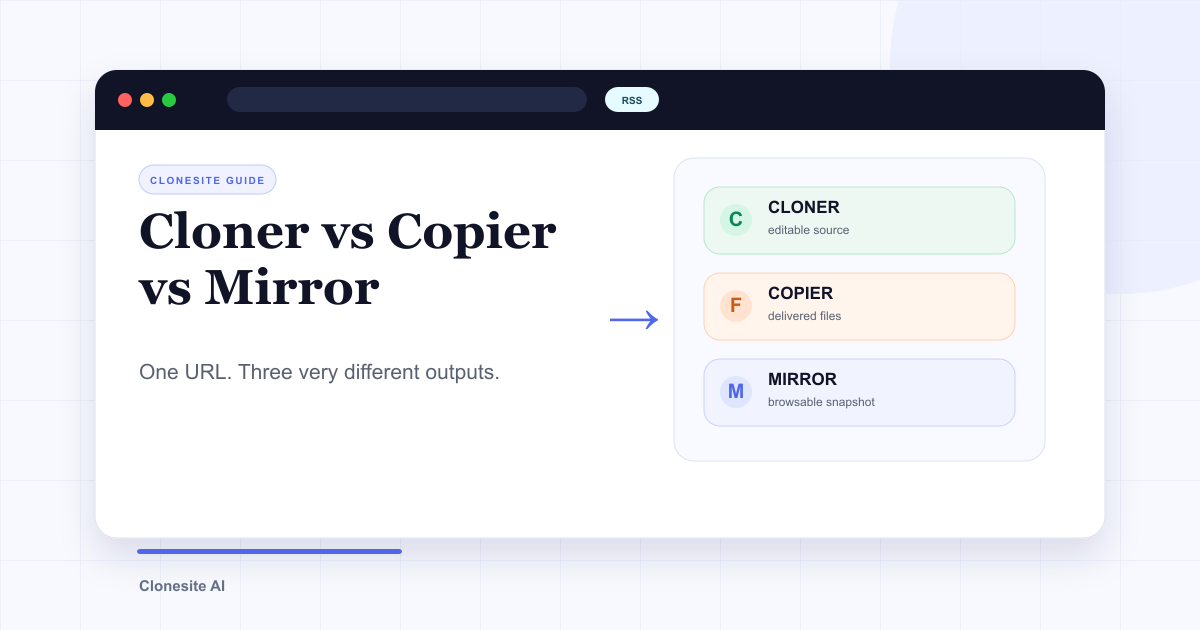 Website Cloner vs Website Copier vs Website Mirror: What Each One Actually SavesA website cloner rebuilds a public page as editable source, a copier downloads files the server sends, and a mirror preserves a browsable snapshot. Choose by what you need to edit, preserve, or publish afterward.
 How Do People Use Clonesite? 6 Ways SMBs Rebuild and Own Their WebsitesPeople use Clonesite to turn any live web page into editable React and Tailwind source. The most common uses are migrating off site builders like Webflow and Framer, rebuilding an outdated site from its live URL, launching from a proven layout, and full-site done-for-you rebuilds.